Limited offer50% off your first month: the $99 plan for $4924 hours onlySee plans

OXYGENvsBreakcold

Oxygen vs Breakcold Breakcold is an inbox for social selling. Oxygen automates the outreach.

Oxygen runs email and LinkedIn sequences, signals that enroll leads and workflows next to a CRM with deals, from $49 a month with no seat per user. Breakcold is a CRM with one inbox for email, LinkedIn, WhatsApp and Telegram, and it leads on CRM depth: email and calendar sync and permissions per role and account.

Used by B2B GTM teams at

  • Sympower
  • SignalFisher
  • Flino
  • FIOR
  • Grasp
  • Growth Alliance
  • Atticus

Oxygen vs Breakcold: the short answer

Choose OXYGEN if

  • You want sequences that mix email with LinkedIn or WhatsApp and stop on a reply; Breakcold hands cold email to Instantly or Smartlead.
  • You want LinkedIn invites, messages and likes to run on their own, at $34 a month per account.
  • You want a profile view or post reaction to enroll the lead in a sequence; Breakcold's signals create deals but enroll no one.
  • You want sending and a CRM from $49 a month with no seat per user; Breakcold charges $49 a seat before a sending tool.

Choose Breakcold if

  • You want email and calendar sync in your CRM, with roles that keep each rep's personal inbox private.
  • You sell on Telegram or WhatsApp and want those chats, groups included, on each record's timeline.
  • You want person and company enrichment free without limit, plus email and phone waterfalls with every seat.
  • You run each client in its own workspace on one bill and invite clients in to see the work.
Best fit by team
TeamPickWhy
A sales team of 3 on email and LinkedInOXYGEN$118.50 a month with sequences included; Breakcold costs $147 before a sending tool.
A solo founder on a tight budgetOXYGENA free workspace with the CRM and no time limit; Breakcold is $49 a month after a 14-day trial.
A team that sells on Telegram and WhatsAppBreakcoldTelegram and WhatsApp chats, groups included, land on each record; Oxygen's sequences have WhatsApp but no Telegram.
A team that wants its CRM synced with email and calendarsBreakcoldEmail and Google Calendar sync with roles and rights per account; Oxygen has no calendar sync.
An agency with a workspace per clientEitherBoth bill client workspaces together; Breakcold lets clients into their workspace, Oxygen sets a credit cap per client.

Why switch from Breakcold to Oxygen

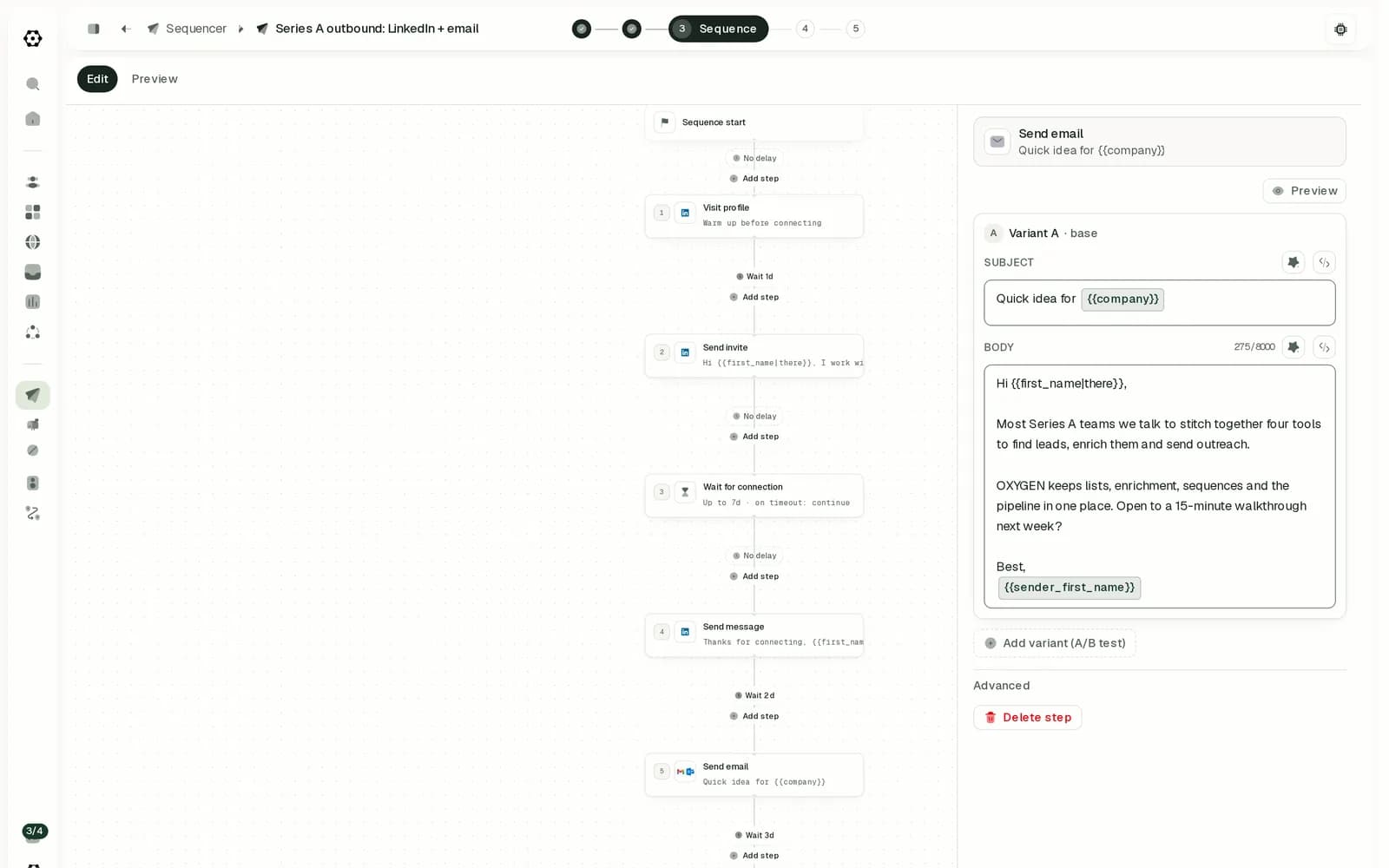
An Oxygen sequence that visits a LinkedIn profile, sends an invite, waits for the connection, sends a message and then an email

Cold outreach needs Instantly, Smartlead or HeyReach

Breakcold pushes leads to Instantly or Smartlead for cold email and to HeyReach for LinkedIn outreach, and takes positive replies back. Oxygen sends email and LinkedIn steps from one sequence, with inboxes at $4 a month including warm-up.

Sequences and inbox in detail

Reps work the LinkedIn feed by hand

Breakcold's blog says automation gets LinkedIn accounts banned, so reps like, comment and message from a feed of prospects' posts. Its AI's follow-ups wait for approval unless switched to Auto. Oxygen runs invites, messages, InMail, likes and comments in the cloud at $34 a month per account.

LinkedIn automation in detail

Signals show up, and none of them enrolls a lead

Breakcold's post feed shows activity, and its AI turns buying signals into deals. Trigify or RB2B push leads in, but no signal enrolls a lead in a sequence. In Oxygen, a profile view or post reaction can enroll the lead in a sequence.

Signals in detail

LinkedIn posts get a preview tool, not a scheduler

Breakcold offers a free tool to preview a LinkedIn post, and we found no way to schedule, approve or measure posts on its pages. Oxygen schedules LinkedIn and X posts, with approval before each one goes out and analytics after.

LinkedIn content publishing in detail

Oxygen vs Breakcold at a glance

Oxygen and Breakcold compared on 13 criteria
CriterionOXYGENBreakcold
Lead data and signals
Lead data from multiple vendorsHow many providers the email waterfall tries on the vendor's credits, and how lookups are billed.Email and phone waterfalls across 18 and 13 providers, on plan credits or own keys from the $99 plan. Managed finders charge on a hit; email checks bill even on a miss. EvenEmail and phone waterfalls through BetterContact and other providers come with every seat, and 50+ person and company data points are free without limit. No own keys found. Even
SignalsWhich buying signals it captures, what they cost, and whether one can start outreach.LinkedIn profile viewers, new followers and post reactions from your connected accounts at no extra cost, plus hiring, funding, news, tech-stack and job-change searches on credits. A signal can start a workflow or enroll the lead in a sequence. AheadA feed of prospects' LinkedIn posts to like and comment on by hand, and AI that turns buying signals in conversations into deals. Trigify, Gojiberry and RB2B push leads in. No signal enrolls a lead in a sequence.
Email, LinkedIn and more channels
Email deliverabilityWarm-up, inbox buying, placement tests, rotation, send limits, bounce protection, then the price of an inbox.Google Workspace and Microsoft 365 inboxes at $4 a month with warm-up included, or a Microsoft tenant at $40 a month for up to 100 inboxes. Placement tests from $1 an inbox a month, inbox rotation, daily limits per mailbox and a bounce auto-pause. AheadSends one-to-one email from connected Gmail, Outlook or IMAP mailboxes. No warm-up, inbox buying, placement tests, rotation, send limits or bounce protection found; it pushes cold email leads to Instantly or Smartlead.
LinkedIn automationWhich steps run on their own, how the account connects, and what 2 senders cost a month.Runs in the cloud with no browser extension: visits, invites, messages, InMail, follows, likes and comments. $34 a month per connected account, every action included. AheadNo automated invites, visits or likes found: reps like, comment and message from a feed of prospects' posts. Its AI's follow-ups wait for approval unless switched to Auto. Each seat covers 2 connected accounts, then $10 each.
WhatsApp, calls and SMSChannels a sequence can use beyond email and LinkedIn. Beta channels do not count.WhatsApp steps at $34 a month per number, over a linked-device connection. Calls from a web softphone are in beta. No SMS. AheadWhatsApp and Telegram chats, groups included, answered one at a time from the shared inbox, and calls synced from Aircall, CloudTalk, JustCall or Ringover. No sequences to hold them, and no SMS.
Sequences and inboxMixed channels, branches, A/B tests, reply stops on every channel, one inbox, AI replies.One sequence mixes email with LinkedIn or WhatsApp, never both, plus call tasks in beta. It branches on connection state, signals or lead data, tests up to 26 versions of a step, and stops a lead when they reply on any channel. Replies land in one inbox with AI triage and drafted answers. AheadNo sequences: it uses AI follow-ups instead of step-based builders. One inbox for email, LinkedIn, WhatsApp and Telegram, where its AI drafts replies and follow-ups on every plan.
LinkedIn content publishingScheduling posts, approving them before they go out, and reading their analytics.Schedule LinkedIn and X posts, approve each before it goes out, and read LinkedIn and X analytics. AheadNo post scheduling, approvals or post analytics found. It offers a free LinkedIn post preview tool.
CRM and integrations
Built-in CRMDeals, a pipeline and custom records in the same workspace, and what they cost.Companies, people, deals and objects you define, a deals pipeline, and an activity timeline where replies land. Free on every plan, the free one included. EvenPeople, companies, deals and custom objects, unlimited Kanban pipelines, and a record timeline with every email, LinkedIn, WhatsApp and Telegram message, all on every plan. Even
CRM depthWhat a full CRM adds: email and calendar sync, reports, permissions, boards and a mobile app.Dashboards for pipeline, outbound and replies, and a deals pipeline board. No calendar sync, permissions per record or mobile app.Syncs email from Gmail, Outlook or IMAP and Google Calendar meetings. An AI daily brief and weekly pipeline report, roles from owner to viewer with rights per account, and Kanban boards. No mobile app found. Ahead
Agencies and client workspacesSeparate client workspaces, one bill across them, and per-client spend limits.A separate workspace per client, client workspaces billed from one plan, and a monthly credit cap per client. Client logins are in beta. EvenA workspace per client under one organization and one bill, extra workspaces at $10 a month, and clients invited into their own workspace. No per-client spend limits found. Even
Workflows and AI
AI and agent accessAn in-app assistant, AI over your rows, cited research, and MCP, CLI and API access.An in-app AI assistant whose workspace chat starts on Auto-approve; turn it off to approve sends and larger paid steps. AI columns over your rows, a research agent that cites its sources, an MCP server, a CLI and an API. AheadChief of Staff, an AI assistant on every plan that chats over the CRM, drafts replies and runs scheduled jobs; AI formulas and meeting insights; an MCP server with 62 tools and an API. No CLI found.
Pricing and security
Pricing modelWhat you pay for, and the monthly list price for three common setups.One plan from $49 a month per workspace, paid in credits, with no seat per user. A LinkedIn account uses $34 of credits a month. AheadPer seat: X1 is $49, X5 $99 and X20 $199 a month, each seat with 2 connected accounts; plans differ only in AI usage. Extra accounts are $10. Quarterly billing saves 10%, yearly 20%. It sends no sequences.
Free plan and trialWhat you can use before paying, and for how long.A free workspace with 250 credits once, the CRM, tables and workflows, and no time limit. Sending needs a paid plan. AheadNo free plan: a 14-day trial, then X1 at $49 a seat a month. Its pricing page asks for a card to start the trial.

Across 13 criteria: OXYGEN ahead on 9 (signals, deliverability, LinkedIn, extra channels, sequences, AI, price, content publishing, free plan), Breakcold ahead on 1 (CRM depth), even on 3. How we compared

Lead data and signals: Oxygen vs Breakcold

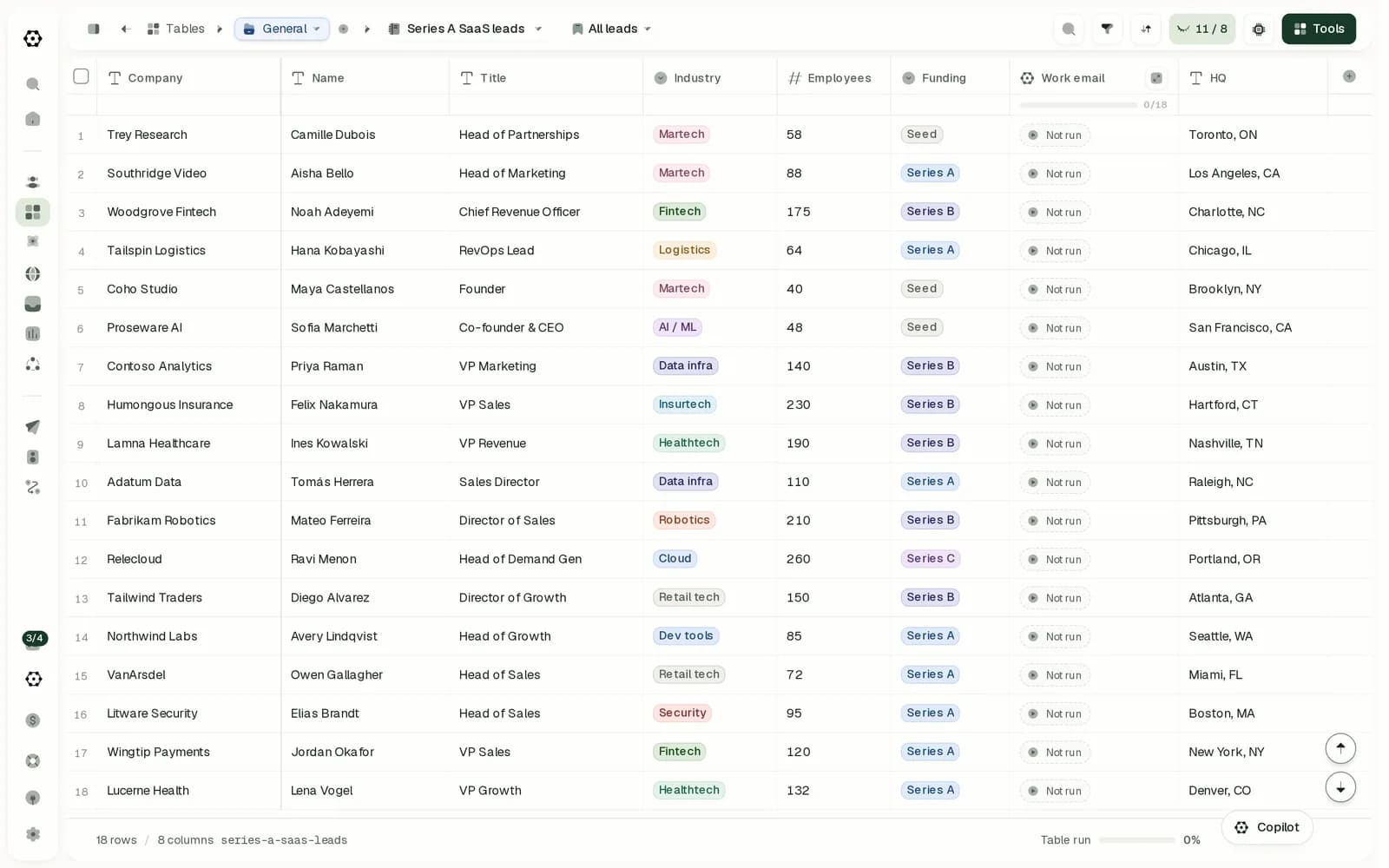
An Oxygen table of 18 leads with company, name, title, industry, employees, funding, a work email column and HQ
A lead list in an Oxygen table. The work email column runs the email waterfall on every row when you start it.

Where does Breakcold get its lead data, and how does Oxygen's compare?

Even. Breakcold's email and phone waterfalls come with every seat, through BetterContact and other providers, and person and company data is free without limit. Oxygen's waterfalls try 18 email and 13 phone providers and take your own keys from the $99 plan.

Does Breakcold track buying signals, and which does Oxygen capture?

Partly. Breakcold shows a feed of prospects' LinkedIn posts, and its AI turns buying signals in conversations into deals. Trigify, Gojiberry or RB2B push leads in, but none of these enrolls a lead in a sequence. Oxygen reads profile viewers, new followers and post reactions at no extra cost, and a signal can enroll the lead in a sequence.

Email, LinkedIn and more channels: Oxygen vs Breakcold

How does Breakcold protect deliverability, and what does Oxygen include?

No. Breakcold sends one-to-one email from the mailboxes you connect and pushes cold email leads to Instantly or Smartlead. Oxygen sends sequences itself, with inboxes at $4 a month including warm-up, plus placement tests, rotation, daily limits and a bounce pause. See mailboxes.

Does Breakcold automate LinkedIn, and what does a sender cost?

Not for invites, visits or likes. Breakcold's blog says automation gets LinkedIn accounts banned, so reps like, comment and message from a feed of prospects' posts. AI follow-ups wait for approval unless set to Auto, and its MCP server lets AI tools such as Claude send messages. Oxygen runs visits, invites, messages, InMail, likes and comments in the cloud at $34 a month per account. Two senders cost $73.70 a month, plan included.

Can Breakcold send WhatsApp or SMS, or place calls, in a sequence?

Not in a sequence. Breakcold syncs WhatsApp and Telegram chats, groups included, for one-to-one replies, and calls from Aircall, CloudTalk, JustCall or Ringover. Oxygen puts WhatsApp steps in a sequence at $34 a number; its calls are in beta and not counted. Neither sends SMS, and Telegram is Breakcold's alone.

Can one Breakcold sequence mix channels, and where do replies land?

No. Breakcold uses AI follow-ups instead of step-based sequences, so there is no sequence to branch or to stop on a reply. Its strength is the inbox: email, LinkedIn, WhatsApp and Telegram in one place, where its AI drafts replies and follow-ups. Oxygen's sequences mix channels, branch, test up to 26 versions and stop on any reply.

Can Breakcold schedule LinkedIn posts?

No. Breakcold has a free LinkedIn post preview tool, and we found no way to schedule, approve or measure posts. Oxygen schedules LinkedIn and X posts, publishes each one only after it is approved and reads their analytics. See how publishing works.
CRM and integrations: Oxygen vs Breakcold

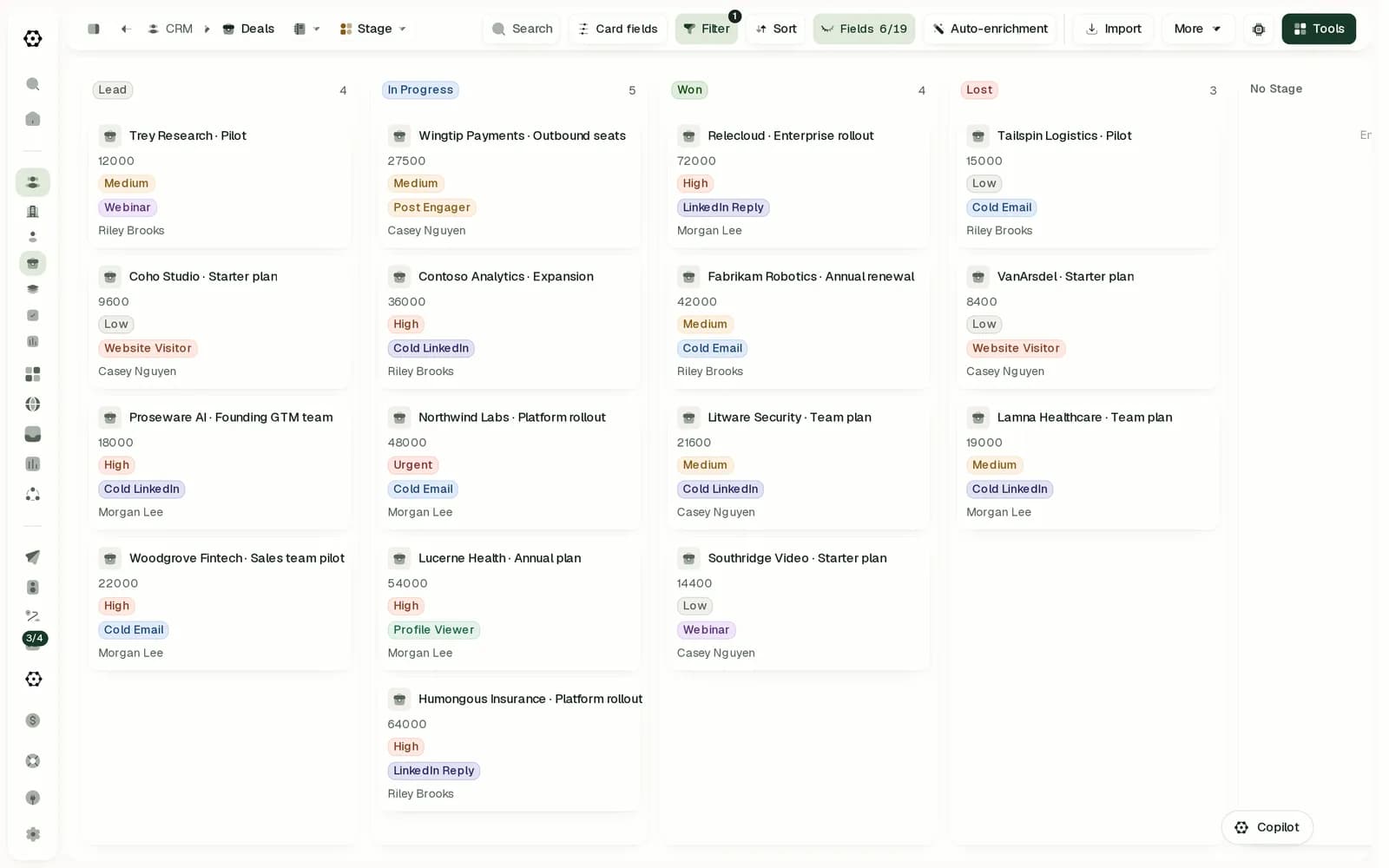
The Oxygen deals board with deals in Lead, In Progress, Won and Lost
Deals on the pipeline board, in the same workspace as the lists and the sequences.

Does Breakcold have a CRM, and how does Oxygen's compare?

Both are full CRMs. Breakcold has people, companies, deals, custom objects, unlimited pipelines and a timeline with every channel's messages. Oxygen's CRM has the same parts, logs sequence replies on the timeline, and is free on every plan, the free one included. The CRM depth row shows where they differ. Our list of the best CRMs for SaaS compares Oxygen with HubSpot, Attio and four more.

How deep is Breakcold's CRM, and how does Oxygen's compare?

Yes, deeper than Oxygen's. Breakcold syncs email and Google Calendar meetings, sets roles from owner to viewer and limits which conversations each rep sees. It has Kanban boards plus an AI daily brief and weekly pipeline report, and we found no mobile app. Oxygen has dashboards and a pipeline board, with no calendar sync, record permissions or mobile app.

Can an agency run its clients in Breakcold?

Both. Breakcold runs each client in its own workspace under one organization and bill, at $10 a month per extra workspace. You can invite each client into its own workspace. Oxygen bills client workspaces from one plan with a monthly credit cap per client; its client logins are in beta.

Workflows and AI: Oxygen vs Breakcold

What can AI do in Breakcold, and can coding agents drive it?

Both have an AI assistant and let coding agents in. Breakcold's Chief of Staff chats over the CRM, drafts replies and runs jobs on a schedule, and its MCP server has 62 tools. Oxygen has an Oxygent, its in-app AI agent, whose workspace chat starts on Auto-approve. It also has a research agent that cites sources and a CLI.

Pricing and security: Oxygen vs Breakcold

How does Breakcold pricing compare with Oxygen for a small team?

Oxygen costs less for both teams below, and its price includes sending. Breakcold charges per seat, from $49 a month on X1, with 2 connected accounts per seat and $10 per extra account. Outreach runs in a second tool. Oxygen is one plan per workspace from $49, paid in credits. See Oxygen pricing.

Does Breakcold have a free plan, and does Oxygen?

No free plan. Breakcold gives a 14-day trial, then charges $49 a seat a month on X1, and its pricing page asks for a card. Oxygen has a free workspace with 250 credits once, the CRM, tables and workflows, and no time limit. Sending needs a paid plan; until then a team can keep its records in Oxygen for free.

Oxygen vs Breakcold pricing for 1 and 3 senders

Monthly list prices on monthly billing
SetupOXYGEN a monthBreakcold a month
1 person on email and LinkedIn$49the $49 plan$49X1, 1 seat and 2 connected accounts; sequences and LinkedIn automation need other tools; $39.20 billed yearly
3 people on email and LinkedIn$118.50the $99 plan plus 1,500 credits in top-ups$147X1, 3 seats and 6 connected accounts; sequences and LinkedIn automation need other tools; $117.60 billed yearly
A team on email only, 3 inboxes$49the $49 plan$59X1, 1 seat and 3 mailboxes for one-to-one email; cold email needs Instantly or Smartlead; $49.20 billed yearly

Switching from Breakcold to Oxygen, or running both

Carries over

  • People, companies and deals, exported from Breakcold as CSV, up to 10,000 records per file, into Oxygen's CRM.
  • Your Google and Microsoft mailboxes, connected to Oxygen directly.
  • Your LinkedIn and WhatsApp accounts, reconnected in Oxygen.

Rebuilt in Oxygen

  • Telegram conversations, which stay in Breakcold.
  • The message timeline on each record, which the CSV export of records and fields leaves out.
  • Meeting recordings and transcripts, which stay in Breakcold.

Run both for a while: keep Breakcold as the inbox for current clients and start new outbound in Oxygen, which reads and writes Breakcold records, notes and tasks through its API on your own Breakcold key from the $99 plan.

Oxygen vs Breakcold FAQ

Is Oxygen cheaper than Breakcold?

For teams, yes, on monthly billing: $118.50 against $147 for 3 people on email and LinkedIn, and $49 against $59 for email only. One person pays $49 on Oxygen and $49 on Breakcold. Breakcold's price covers its CRM and inbox; outreach needs another tool.

Does Breakcold automate LinkedIn?

Not for invites, visits or likes. Breakcold's blog says automation gets LinkedIn accounts banned, so you like, comment and message from a feed of prospects' posts. Its AI drafts replies and follow-ups. Its pricing page says you approve every send, and its Chief of Staff page lets you switch follow-ups to Auto. Its MCP lets an AI agent send LinkedIn messages. Oxygen runs invites, messages, InMail, likes and comments in the cloud at $34 a month per account.

Can Breakcold send cold email sequences?

No. Breakcold sends one-to-one email from connected mailboxes, with no sequences, warm-up or mailbox buying. It pushes leads to Instantly or Smartlead for cold email, and both push positive replies back into Breakcold. Oxygen sends email and LinkedIn steps from one sequence and stops a lead when they reply.

How much does Breakcold cost?

Breakcold charges per seat: $49 a month on X1, $99 on X5 and $199 on X20. Each seat comes with 2 connected accounts, and plans differ only in how much AI work each seat gets. Extra accounts and workspaces are $10 a month each. Quarterly billing saves 10% and yearly 20%, or $39.20 a seat a month on X1.

Can I move from Breakcold to Oxygen?

Yes. Export people, companies and deals as CSV, up to 10,000 records per file, import them into Oxygen's CRM, and reconnect your mailboxes, LinkedIn and WhatsApp. Message timelines and Telegram stay in Breakcold. Move each contact before your first sequence reaches them, so nobody hears from both tools.

Does Breakcold have an MCP server?

Yes: a hosted MCP server, with 62 tools on its MCP page for records, tasks, notes, the inbox and meetings. Its inbox tools can send email, LinkedIn, WhatsApp and Telegram messages. Oxygen has an MCP server too, plus a CLI and a research agent that cites its sources.

When is Breakcold the better choice?

When the CRM matters most and outreach already runs elsewhere. Breakcold syncs email and Google Calendar meetings, sets roles and rights per account and keeps Telegram and WhatsApp chats on each record. Agencies can invite clients into their workspace. On the other rows of this comparison, Oxygen leads or the two are even.

How we compared Oxygen and Breakcold

We make OXYGEN, so read this as an interested comparison. Every comparison on this site scores both products on the same rubric, and a fixed rule decides each row from the facts, never a writer. This page shows the 13 criteria that decide a choice between OXYGEN and Breakcold. We also scored tables, CRM syncs, workflows and security and left them out; Breakcold leads on none of them. Breakcold facts come from Breakcold's own pages, checked on the dates below; OXYGEN facts and prices come from the product and its live price list.

Sources for Breakcold, checked November 14, 2026

Breakcold is a trademark of its owner and is not affiliated with OXYGEN. Something out of date? Tell us.